반응형
1씩 카운팅할때 const쓰면 안됨 (외부변수와 지역변수 자체가 이름은 같은데 다른변수임)
=> 이럴땐 useState써야함
const [변수, 변경함수] = useState(변수기본값) 변경함수: 변수의 값을 바꾸는 함수
ex) 잘못된예시
  const variable =1;
  function editVariable(){
    const variable = variable +1;
  }
ex) 올바른예시
  const [variable, setVariable] = useState(1);
  function editVariable() {
    setVariable(3);
    console.log(variable);
  }
ex) 전체코드
import React, { useState } from "react";
import logo from "./logo.svg";
import "./App.css";

function App() {
  const [variable, setVariable] = useState(1);
  function editVariable() {
    setVariable(3);
    console.log(variable);
  }

  return (
    <div className="App">
      <button onClick={() => editVariable()}>안녕</button>
    </div>
  );
}

export default App;
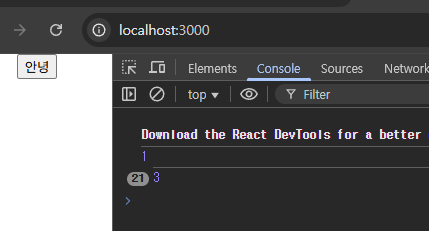
기본값3초기화후, 버튼클릭시 카운팅됨을 확인할수있다
<1씩증가>
1씩 카운트 상승은 variable + 1 로 하면된다
const [variable, setVariable] = useState(1);
function editVariable() {
    setVariable(variable+1);
    console.log(variable);
  }
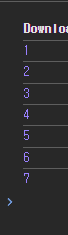
결과
<화면에 카운트 출력>
{}를 이용해서 변수를 출력해주면됨
variable + 1 방식 은 실무에서 거의 안쓰임, (prev) => prev + 1 처럼 함수형업데이트를 많이 씀
<h1>{variable}</h1>import React, { useState } from "react";
import logo from "./logo.svg";
import "./App.css";
function App() {
const [variable, setVariable] = useState(1);
function editVariable() {
setVariable(variable+1);
console.log(variable);
}
return (
<div className="App">
<button onClick={() => editVariable()}>count + 1</button>
<h1>{variable}</h1>
</div>
);
}
export default App;
결과
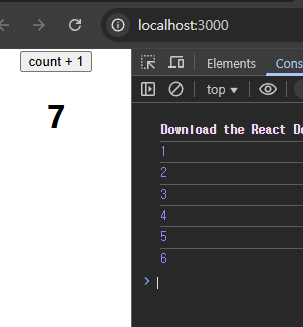
< (prev) => prev + 1 >
(prev) => prev + 1 은 이전상태값에서 +1 하는거로 실무에서 variable + 1 보다 훨씬 많이쓰임
count + 1 적힌 부분처럼 수가 동시다발적으로 들어오면, 리액트에서 전에있는 값을 읽지못하고 한번만 더하는 현상이 있을수있는데 이걸 방지하고자, 이전값을 가져와서 +1 하면 해결할수있음
const [variable, setVariable] = useState(0);
  function editVariable() {
    setVariable(prev => prev+1);
    console.log(variable);
  }
import React, { useState } from "react";
import logo from "./logo.svg";
import "./App.css";
function App() {
const [variable, setVariable] = useState(0);
function editVariable() {
setVariable(prev => prev+1);
console.log(variable);
}
return (
<div className="App">
<button onClick={() => editVariable()}>count + 1</button>
<h1>{variable}</h1>
</div>
);
}
export default App;
< 동기, 비동기 >
<button onClick={editVariable}>count + 1</button>
= <button onClick={() => editVariable()}>count + 1</button>
둘다 같이 동작하지만 아래건 비동기방식임
() => 함수() 이렇게 쓰는 방식 : 비동기방식 (가장먼저 실행해달라고 적는것임)
반응형
'앱개발' 카테고리의 다른 글
| [앱개발] V-World 지도, Google Maps API키 발급 (10) | 2025.08.05 |
|---|---|
| [앱개발] 리액트네이티브 구글애드몹 (React-native Google Admob) 앱광고달기 (5) | 2025.08.05 |